How to redeem Throw a Coin codes in Roblox.

Throw a Coin codes will help you claim free Luck Boosts in the Roblox incremental simulator. The experience is all about flipping coins into a fountain, which lets you get items you can sell to upgrade your gear.
How valuable each item is depends on your character’s luck, but you can boost this stat by redeeming codes for Throw a Coin. Codes are shared in the game’s Discord server, but to save you time we’ve rounded up the latest codes below.
To see this content please enable targeting cookies.
All working Throw a Coin codes
Here are all the working Throw a Coin codes as of 28th July 2026:
- candy: 5x Luck Boost (5 minutes) NEW
- WORLD3: 5x Luck Boost (10 minutes) NEW
- Luckyducky: 1 Divine Rubber Duck NEW
How to redeem codes in Throw a Coin
Not sure how to redeem codes in Throw a Coin? Here’s what you need to do:
- Launch Throw a Coin in Roblox.
- Complete the tutorial if you haven’t done so already.
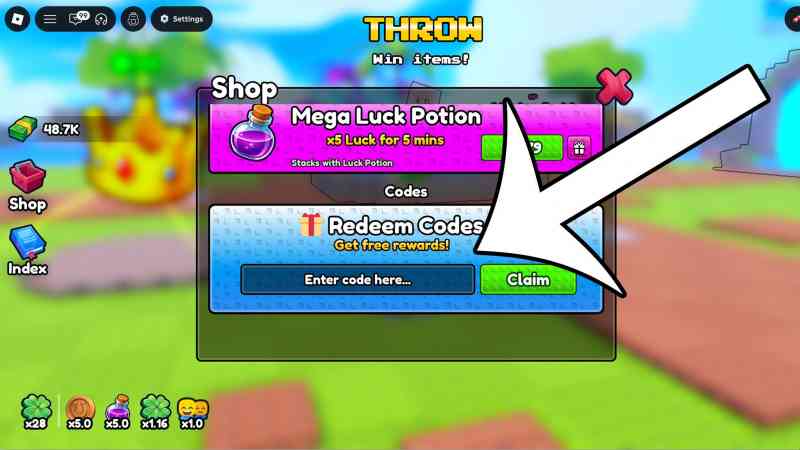
- Select the ‘Shop’ button on the left.
- Scroll down until you get to the codes section.
- Type a code into the text box and then press the ‘Claim’ button.



All expired Throw a Coin codes
Currently, there are no expired codes for Throw a Coin. The game only launch recently, but if any codes stop working then we’ll update this section.
That wraps up our list of Throw a Coin codes. If you need help with other Roblox games, make sure you check out our pages for Anime Expeditions codes, Gakuran codes, Rintama High codes, Build a Soccer Squad codes, and Speed Keyboard Escape codes.